
<TfModule>
The <TfModule> block parses an OpenTofu/Terraform module, dynamically renders a web form to collect values for all the module’s variables, and publishes the collected values as outputs that can be referenced by other blocks.
In other words, it turns this OpenTofu/Terraform file:
variable "bucket_name" {  type        = string  description = "Name of the S3 bucket"  validation {    condition     = can(regex("^[a-z0-9][a-z0-9.-]*[a-z0-9]$", var.bucket_name))    error_message = "Must be lowercase alphanumeric with dots and hyphens."  }}
variable "versioning_enabled" {  type        = bool  default     = true  description = "Enable versioning"}
variable "tags" {  type        = map(string)  default     = {}  description = "Tags to apply"}
# @runbooks:group "Lifecycle"variable "expiration_days" {  type        = number  default     = 0  description = "Days before expiration"}
# @runbooks:group "Lifecycle"variable "transition_to_glacier_days" {  type        = number  default     = 0  description = "Days before Glacier transition"}
Into this runbook input form:
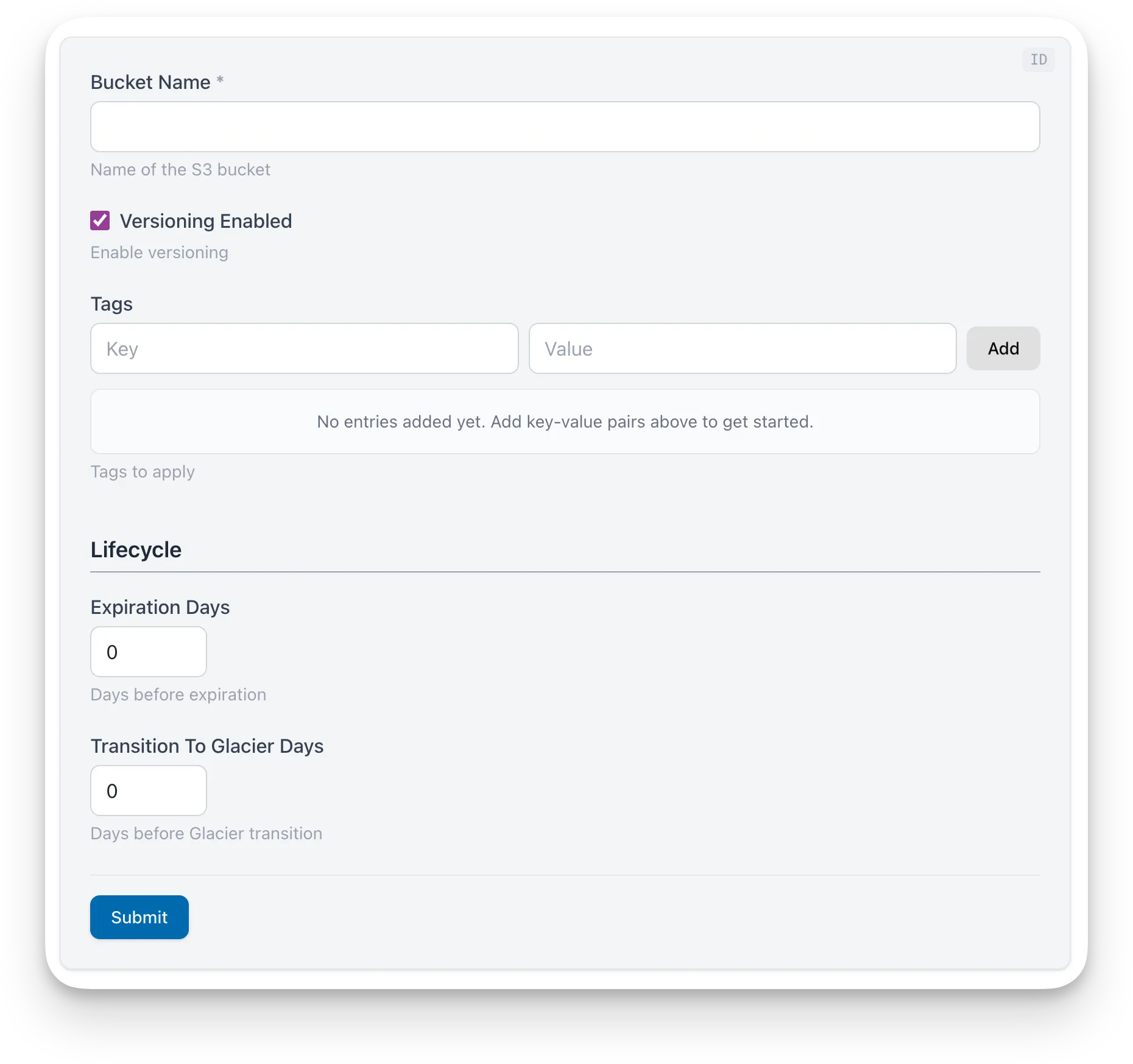
Note that the OpenTofu/Terraform author can annotate some variables with # @runbooks:group "Group Name" comments to group them together under a common heading, in this case “Lifecycle”.
Why use TfModule?
Section titled “Why use TfModule?”The TfModule makes it possible to dynamically render a runbook based on an OpenTofu/Terraform module. For example:
runbooks open https://github.com/gruntwork-io/runbooks/tree/main/testdata/test-fixtures/tf-modules/s3-bucketThis means that every OpenTofu/Terraform module you’ve already defined can be used to generate a runbook that will collect values for the module’s variables and then generate any file output format, such as a Terragrunt HCL file, Helm chart YAML file, CloudFormation template, or anything else.
The TfModule is a core building block for this use case, but you can also define a custom runbook that will be used to open the module. To learn more about opening runbooks based on OpenTofu/Terraform modules, see the Opening Runbooks docs.
Basic Usage
Section titled “Basic Usage”The most common pattern for TfModule is a generic runbook that accepts any module URL from the CLI using ::cli_runbook_source:
<TfModule id="module-vars" source="::cli_runbook_source" />
<Template id="output" inputsId="module-vars" path="templates/terragrunt" />
The ::cli_runbook_source keyword resolves to whatever module URL was passed to runbooks open. This lets a single runbook work with any OpenTofu/Terraform module. See Opening Runbooks for the full guide on custom templates and built-in templates.
You can also reference a specific module by path or URL:
<TfModule id="rds-vars" source="../modules/rds" />
<Template id="rds-output" inputsId="rds-vars" path="templates/rds" />
This is useful when you’re writing a runbook for a known module. The <TfModule> block parses the .tf files at ../modules/rds and renders a web form. The <Template> block imports the values via inputsId and generates files from the template at templates/rds.
vs. Inputs
Section titled “vs. Inputs”Both <TfModule> and <Inputs> collect user values and publish them to context, but they serve different purposes.
<TfModule>parses.tffiles (OpenTofu/Terraform modules) at runtime and auto-generates an input form from the module’s variables. It provides a_modulenamespace with source, metadata,inputs, andhcl_inputs, enabling dynamic iteration over all variables without knowing their names upfront. Use it when you want to generate files from an existing OpenTofu/Terraform module.<Inputs>defines variables explicitly in inline YAML or aboilerplate.yml. Each variable must be referenced by name in templates. Use it when you want to collect arbitrary user input that doesn’t come from a.tfmodule.
| Prop | Type | Required | Description |
|---|---|---|---|
id | string | Yes | Unique identifier for this component. Other blocks reference this ID via inputsId to access the collected values. |
source | string | Yes | Path or URL to the OpenTofu/Terraform module directory containing .tf files.See Supported Source Formats below. |
Supported Source Formats
Section titled “Supported Source Formats”The source prop accepts the same formats as the runbooks open CLI command:
| Format | Example |
|---|---|
| Local relative path | ../modules/rds |
| Colocated (same directory) | . |
| Dynamic from CLI | ::cli_runbook_source |
| GitHub shorthand | github.com/org/repo//modules/rds?ref=v1.0.0 |
| Git prefix | git::https://github.com/org/repo.git//modules/rds?ref=v1.0.0 |
| GitHub browser URL | https://github.com/org/repo/tree/main/modules/rds |
| GitLab browser URL | https://gitlab.com/org/repo/-/tree/main/modules/rds |
Colocated Runbooks (source=".")
Section titled “Colocated Runbooks (source=".")”When a module author places a runbook.mdx alongside their .tf files, they can use source="." to reference the module in the same directory. When someone runs runbooks open pointing at that directory (locally or via a remote URL), the CLI detects the colocated runbook.mdx and serves it instead of auto-generating a generic one.
This lets module authors ship a custom, polished runbook experience alongside their module code:
modules/rds/├── main.tf├── variables.tf├── outputs.tf└── runbook.mdx ← custom runbookInside runbook.mdx:
# Configure RDS
<TfModule id="rds-vars" source="." />
<TemplateInline inputsId="rds-vars" outputPath="terragrunt.hcl" generateFile={true}>```hclterraform {  source = "{{ ._module.source }}"}
inputs = {{{- range $name, $hcl := ._module.hcl_inputs }}  {{ $name }} = {{ $hcl }}{{- end }}}```</TemplateInline>
Anyone can then run this module’s custom runbook:
runbooks open https://github.com/my-org/infra-modules/tree/main/modules/rdsDynamic Source from CLI
Section titled “Dynamic Source from CLI”The ::cli_runbook_source keyword resolves to whatever module URL was passed to the runbooks open command (or runbooks watch / runbooks serve). This enables a generic runbook that works with any OpenTofu/Terraform module without hardcoding a specific module path.
<TfModule id="module-vars" source="::cli_runbook_source" />If the runbook is opened without a module URL, <TfModule> renders a message explaining how to provide one.
Block Outputs
Section titled “Block Outputs”<TfModule> publishes outputs that downstream blocks can consume. The _module namespace is accessed via inputsId in templates; the uppercase outputs are accessed via {{ ._blocks.<id>.outputs.<key> }}.
| Output | Access | Description |
|---|---|---|
_module | inputsId | Map containing module metadata, user inputs, and HCL-formatted values. See structure below. |
MODULE_NAME | ._blocks | The module’s folder name (same as _module.folder_name). Useful in outputPath expressions for naming generated directories. |
SOURCE | ._blocks | The resolved module source URL. |
For example, the ::terragrunt-github template uses MODULE_NAME to compose the output path:
outputPath="{{ ._blocks.target_path.outputs.PATH }}/{{ ._blocks.module_vars.outputs.MODULE_NAME }}/terragrunt.hcl"The _module Namespace
Section titled “The _module Namespace”When <TfModule> registers its values, it outputs a _module value that is a map of key-value pairs. This enables both iteration over all variables and direct access to specific ones.
You can access the _module value in your templates just like any other value, using the {{ ._module }} syntax.
Structure
Section titled “Structure”_module: source: "github.com/org/repo//modules/rds?ref=v1.0.0" folder_name: "rds" readme_title: "RDS Module" output_names: ["db_endpoint", "db_name", "db_port"] resource_names: ["aws_db_instance.this", "aws_db_parameter_group.this", "aws_db_subnet_group.this"] inputs: instance_class: "db.t3.micro" engine_version: "16.3" allocated_storage: 20 multi_az: true hcl_inputs: instance_class: "\"db.t3.micro\"" engine_version: "\"16.3\"" allocated_storage: "20" multi_az: "true" hcl_inputs_non_default: instance_class: "\"db.t3.micro\"" allocated_storage: "20" multi_az: "true"source: The module source from thesourceprop. Useful for embedding in generated config.folder_name: Name of the module’s containing directory (e.g.,"rds").readme_title: The first# Headingfrom the module’s README.md, if present. Empty string otherwise.output_names: List of output block names defined in the module (sorted alphabetically).resource_names: List of resource block names astype.name(sorted, excludesdatasources).inputs: Map of all variable names to their raw values as entered by the user. Use when generating non-HCL formats (YAML, JSON, TOML) where you control the formatting.hcl_inputs: Map of all variable names to HCL-formatted string values: strings are quoted, booleans and numbers are raw, lists and maps are JSON-encoded. Use when generating HCL files (Terragrunt, Terraform). Values are pre-formatted with correct HCL quoting.hcl_inputs_non_default: Same ashcl_inputs, but only includes variables whose current value differs from the module’s declared default. Required variables (no default) are always included.
What Gets Parsed
Section titled “What Gets Parsed”<TfModule> reads every .tf file in the module directory and extracts the following from each variable block:
| Property | HCL Attribute | How It’s Used |
|---|---|---|
| Name | variable "name" | Becomes the form field name and the key in _module.inputs. |
| Type | type | Mapped to a form widget: string → text input number → numeric input bool → toggle list / set → list editor map / object → key-value editor any or empty → string optional(T) → unwraps to T |
| Description | description | Displayed as help text below the form field. May be enriched with validation context (see below). |
| Default | default | Pre-populates the field. Variables without a default are marked required. |
| Sensitive | sensitive | Sensitive variables are masked in the form. |
| Nullable | nullable | Nullable variables are treated as optional even when they lack a default. |
| Source file | (derived) | Which .tf file the variable was defined in. Used for filename-based grouping. |
| Group comment | # @runbooks:group "Name" | A comment placed directly above a variable block. Used for explicit grouping (see Variable Grouping). |
Validation Mapping
Section titled “Validation Mapping”<TfModule> also reads validation blocks and maps recognized patterns to client-side form validations, so the user gets instant feedback without submitting the form.
| HCL Pattern | Form Behavior |
|---|---|
can(regex("pattern", var.x)) | Validates the input against the regex pattern. |
contains(["a", "b", "c"], var.x) | Renders a dropdown instead of a text input, populated with the listed options. If no default, the first option is auto-selected. |
length(var.x) >= N && length(var.x) <= M | Enforces minimum and maximum character length. |
var.x != "" or length(var.x) > 0 | Marks the field as required. |
var.x >= N && var.x <= M | Appends “(Must be between N and M)” to the description. |
Validation blocks that don’t match any of the patterns above still contribute: if the block has an error_message, it is appended to the field’s description as a constraint hint.
Variable Grouping
Section titled “Variable Grouping”When <TfModule> renders the input form, it automatically “groups” variables into collapsible sections. Grouping is purely a UI feature that organizes a set of variables together under a common heading to help reduce cognitive load on the end user. This is especially useful when a module has many variables and would otherwise render as an endless of form fields. Grouping has no effect on the generated output or template behavior.
So how does Runbooks know which variables to group together? The grouping strategy follows a priority order:
@runbooks:groupcomments: explicit groups defined in the.tfsource- Filename-based: variables grouped by which
.tffile they’re defined in - Prefix-based: variables grouped by shared name prefixes (e.g.,
db_*,vpc_*) - Required vs. Optional: fallback grouping
@runbooks:group Comments
Section titled “@runbooks:group Comments”Module authors can explicitly control grouping by adding # @runbooks:group "Group Name" comments directly above variable blocks in their .tf files:
variable "bucket_name" {  type        = string  description = "Name of the S3 bucket"}
# @runbooks:group "Lifecycle"variable "expiration_days" {  type        = number  default     = 0  description = "Days before expiration"}
# @runbooks:group "Lifecycle"variable "transition_to_glacier_days" {  type        = number  default     = 0  description = "Days before Glacier transition"}
In this example, the two lifecycle variables are grouped together under a “Lifecycle” section. The bucket_name variable (with no annotation) appears in an unnamed default section.
Template Patterns
Section titled “Template Patterns”Using <TemplateInline>
Section titled “Using <TemplateInline>”<TemplateInline> embeds the template directly in the runbook. It’s a good choice for generating a single file because everything is visible and editable in one place with no external files needed.
For Terragrunt HCL
Section titled “For Terragrunt HCL”One common pattern is generating a terragrunt.hcl that “instantiates” an OpenTofu/Terraform module. Here, we iterate over all module variables using _module.hcl_inputs:
<TfModule id="module-vars" source="../modules/rds" />
<TemplateInline inputsId="module-vars" outputPath="terragrunt.hcl" generateFile={true}>```hclterraform {  source = "{{ ._module.source }}"}
include "root" {  path   = find_in_parent_folders("root.hcl")  expose = true}
inputs = {{{- range $name, $hcl := ._module.hcl_inputs }} {{ $name }} = {{ $hcl }}{{- end }}}```</TemplateInline>Non-Default Inputs
Section titled “Non-Default Inputs”The example above will render every module variable, even those left empty or matching the declared default. This could be quite verbose in some cases. Use _module.hcl_inputs_non_default instead to generate a minimal inputs block that excludes any variable whose value matches the default defined in the module’s .tf file:
<TfModule id="module-vars" source="../modules/rds" />
<TemplateInline inputsId="module-vars" outputPath="terragrunt.hcl" generateFile={true}>```hclterraform {  source = "{{ ._module.source }}"}
include "root" {  path   = find_in_parent_folders("root.hcl")  expose = true}
inputs = {{{- range $name, $hcl := ._module.hcl_inputs_non_default }}  {{ $name }} = {{ $hcl }}{{- end }}}```</TemplateInline>
Referencing Individual Variables
Section titled “Referencing Individual Variables”You can also reference specific variables by name instead of iterating:
<TfModule id="module-vars" source="../modules/rds" />
<TemplateInline inputsId="module-vars" outputPath="summary.txt">```Instance Class: {{ .instance_class }}Engine Version: {{ .engine_version }}Module Source: {{ ._module.source }}```</TemplateInline>
Using <Template>
Section titled “Using <Template>”<Template> points to a separate directory containing a boilerplate.yml and one or more template files. Use it when you need multi-file scaffolding or extra variables beyond what the module defines.
Multiple Output Files
Section titled “Multiple Output Files”A single <Template> block can produce multiple files. To do this, add more template files to the template directory:
<TfModule id="module-vars" source="../modules/rds" />
<Template id="rds-scaffold" path="templates/rds-scaffold" inputsId="module-vars" />
Inside templates/rds-scaffold/terragrunt.hcl:
terraform {  source = "{{ ._module.source }}"}
inputs = {{{- range $name, $hcl := ._module.hcl_inputs }}  {{ $name }} = {{ $hcl }}{{- end }}}
Inside templates/rds-scaffold/README.md:
# {{ ._module.readme_title }}
Source: `{{ ._module.source }}`
## Outputs
{{- range ._module.output_names }}- `{{ . }}`{{- end }}
Extra Variables with Template
Section titled “Extra Variables with Template”Because <Template> is backed by a boilerplate.yml, it renders its own input form in addition to the form that <TfModule> renders. Any variables defined in boilerplate.yml that are not provided by TfModule appear as extra editable fields, giving you a way to collect additional user input (e.g., environment name, team owner) that the .tf files know nothing about.